Meta Business Portfolio
Your WhatsApp Business account sits inside your Meta Business Portfolio. I connect it to Klaviyo and verify the portfolio, which Meta recommends and requires for some options, like its free phone number.
Klaviyo WhatsApp marketing
I set up WhatsApp inside Klaviyo, next to your email and SMS: your Meta business account and number, WhatsApp consent, approved templates, flows, campaigns, and two-way conversations. It's the channel your customers already use every day in markets like the UK, Europe, Latin America, the Middle East, and India.
5.0 on Fiverr and Upwork · 190+ projects delivered · Klaviyo Product certified
Brands I've worked with
Is it right for you?
Selling mostly in the US? Since April 1, 2025, Meta hasn't delivered WhatsApp marketing messages to US numbers. For a US audience, I set up Klaviyo SMS instead, and use WhatsApp only for your international customers.
Three channels
All three live in the same Klaviyo profiles, so I can choose the right channel for each customer and each moment.
| SMS | |||
|---|---|---|---|
| Format | Images, buttons, and two-way chat | Short text, MMS in some countries | Fully designed emails |
| Consent | Its own WhatsApp opt-in | Its own SMS opt-in | Email opt-in |
| Messages | Meta-approved templates to start a chat | Free text within the rules | Free design |
| Cost | Per delivered template, by country | Per message segment, by country | Included in your Klaviyo plan |
| US marketing | Not delivered by Meta | Yes | Yes |
| Best for | Conversations and high-intent moments | Urgent, short nudges | Detail, stories, and newsletters |
The setup
WhatsApp runs through Meta, so there are a few more pieces than with SMS. I handle them in the right order.
Your WhatsApp Business account sits inside your Meta Business Portfolio. I connect it to Klaviyo and verify the portfolio, which Meta recommends and requires for some options, like its free phone number.
You can use an existing business number, as long as it isn't connected to a personal WhatsApp account. A number can only be active with one WhatsApp provider at a time, so if it's already in use elsewhere, I migrate it. Numbers from providers like Twilio or Infobip work too.
This is the name customers see instead of your phone number. Each number has its own display name, and Meta has to approve it, so I set it up early and follow Meta's naming rules.
WhatsApp needs a Klaviyo Mobile Messaging plan. Your WhatsApp spend comes out of the same plan as SMS, so I plan the budget across both channels.
I set up subscribe and opt-out keywords, add opt-out instructions to your templates, and make sure opt-outs sync to the customer's profile straight away.
Meta rates the quality of your account and templates. I use Klaviyo's WhatsApp deliverability hub to watch account quality, message performance, and policy risks.
Consent
Someone who signed up for SMS, or gave you their phone number at checkout, hasn't agreed to WhatsApp messages. WhatsApp needs its own explicit opt-in that names your business.
A WhatsApp step in your popup, including a form that only shows to existing email subscribers.
A button that opens WhatsApp with a pre-filled message. The customer sends it, and they're subscribed.
Customers message a keyword like “JOIN” to subscribe, from a link, a QR code on packaging, or a store display.
Meta ads that open a WhatsApp chat with a “Subscribe” keyword ready to send.
After signup, the customer gets a confirmation message and replies with the exact keyword, like YES, to join.
Existing WhatsApp subscribers can be uploaded to Klaviyo, but only with documented WhatsApp consent.
Templates
WhatsApp only lets a business start a conversation with a template Meta has approved in advance. Approval usually takes a few minutes and can take up to 24 hours, so I create and submit templates well before a launch.
| Part | Rules |
|---|---|
| Header | Optional. Text up to 60 characters, or a JPG or PNG image up to 5 MB |
| Body | Required. Up to 1,024 characters, with personalization like name or product |
| Footer | Optional. Up to 60 characters. I use it for opt-out instructions |
| Quick replies | Up to 10 buttons, like “Yes, hold it” or “Talk to us” |
| Website buttons | Up to 2, with trackable links |
| Other buttons | Call your phone number, or copy a discount code |
| Button labels | Up to 25 characters each |
Approved templates get a quality rating from Meta: high, medium, or low. Templates that people block or report drop in quality, so I write them to be useful first.
Flows and campaigns
TriggerWhatsApp opt-in
Deliver the signup offer straight away and invite the first question.
TriggerAdded to Cart
A friendly reminder with the product, and a button to ask a question before buying.
TriggerViewed Product
Only for repeat viewers, so it helps rather than feels like being watched.
TriggerPlaced Order
Thank-you, how-to-use tips, and a review request later on.
TemplateTransactional
Order confirmations and delivery updates, sent with transactional templates.
AudienceWhatsApp segments
Launches, restocks, VIP early access, and sales, including multilingual sends with Klaviyo's Smart Translations.
One channel per moment. I don't send the same message on email, SMS, and WhatsApp. For each flow, I pick the channel the customer is most likely to respond to, and I use Smart Sending so no one gets messaged too often.
Conversations
WhatsApp is a conversation, not a broadcast. That's what makes it powerful, and it's why the setup needs a plan for answering.
You can reply freely, without an approved template.
Each new message from the customer gives you another 24 hours.
To continue, you send an approved follow-up template.
Service replies inside the window, keyword replies, and inbox messages don't cost extra.
Costs
Meta sets the prices, and Klaviyo passes them on through your Mobile Messaging plan.
How I set it up
Where your customers are, which markets WhatsApp suits, and what it will cost per message there.
Business Portfolio, verification, phone number, display name, and the connection to Klaviyo.
Forms, tap-to-text, keywords, QR codes, and double opt-in, plus opt-out handling.
Approved templates, then welcome, cart, browse, post-purchase, and order updates.
Segmented campaigns, reply handling, and monthly reporting on cost, delivery, and revenue.
Rules differ by country. I follow Meta's WhatsApp Business Policy and Klaviyo's recommended practices, but I don't give legal advice. For privacy law questions in your markets, I recommend checking with qualified counsel.
Results
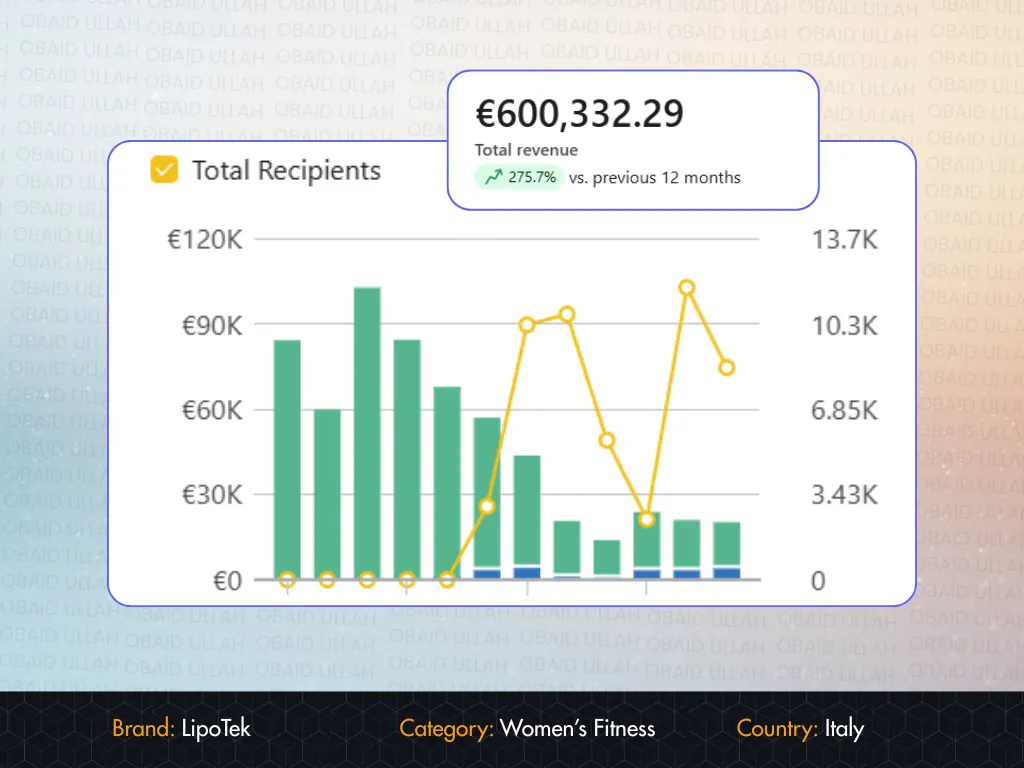 LipoTek · ItalyFrom €161K to €600K in email + SMS revenue, including €90K in a single BFCM weekendRead the case study →
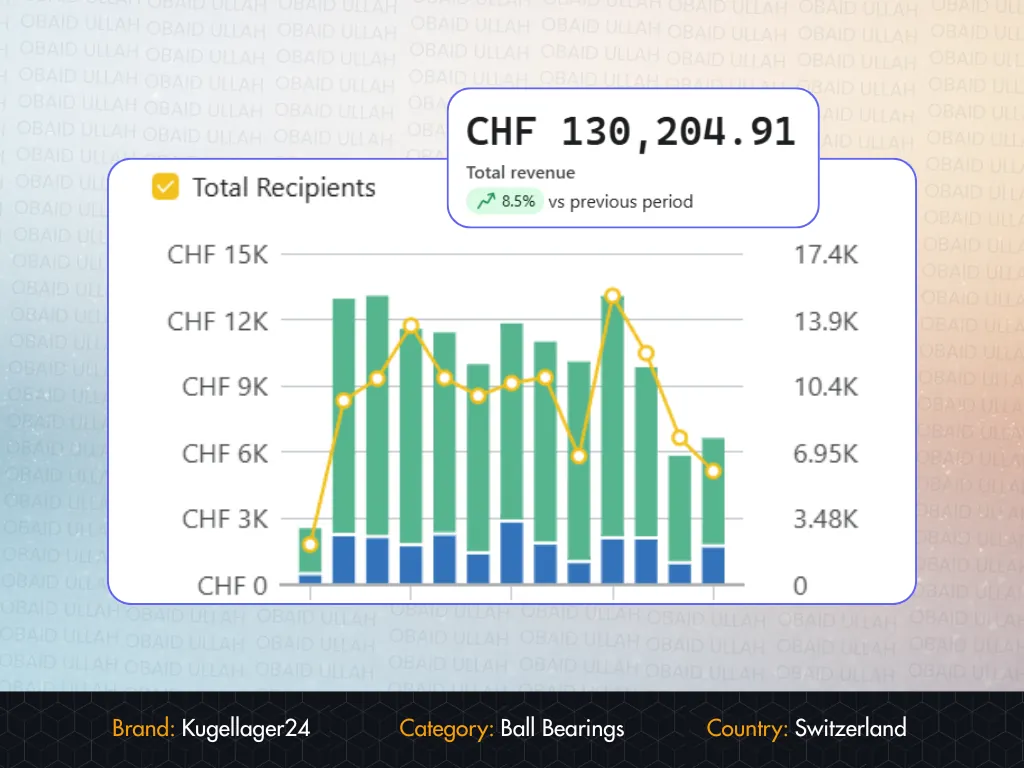 Kugellager24 · SwitzerlandSpam complaints from over 0.4% to 0.01%, and email revenue share from 6% to 34% in 11 weeksRead the case study →
Our post-purchase flow was a single thank-you email. Obaid turned it into a 5-part sequence that now generates repeat orders on autopilot. Genuinely impressive work.

Obaid U is a stellar freelancer in email marketing, showcasing STRATEGIC thinking and meticulous attention to detail. Working with him is a breeze thanks to his quick responses, politeness, and deep understanding of the project needs. Highly recommend! 👏
Working with Obaid U in the realm of Email Marketing was an EXCEPTIONAL experience. The professionalism and attention to detail in his work exceeded expectations, while his proactive communication and cooperation made the process smooth and efficient. Highly recommend for anyone looking to elevate their email marketing efforts! 🙌
FAQ
Let's talk
Tell me which countries you sell to and what you're sending today. The first conversation is free, and I'll tell you honestly whether WhatsApp is worth it for your store, or whether SMS or email will do more.

