Klaviyo email deliverability for Shopify and WooCommerce brands
I make sure your Klaviyo emails land in the inbox, not in spam. That starts with a branded sending domain and correct SPF, DKIM, and DMARC, but it doesn't stop there. Your reputation, list quality, engagement, and sending habits decide where every email ends up, so I work on all of them.
★★★★★ 5.0 on Fiverr and Upwork · 190+ projects delivered · Klaviyo Product certified
Brands I've worked with
KUGELLAGER24
Flushhh
LipoTek
Pestle & Pods
MantaSocks
Afritude
+ more under NDA
What deliverability means
Delivered isn't the same as inboxed.
Delivery
Gmail or Yahoo accepted the email.
Deliverability
Where the accepted email actually shows up: the inbox, the Promotions tab, or spam.
Klaviyo can tell you an email was delivered, but it can't always tell you which folder it landed in. A 99% delivery rate can still hide a spam folder problem. That's why I look at deliverability as a whole system, not a single setting.
AuthenticationDomain reputationList qualityEngagementSending behaviorContentBounces and complaints
Your sending domain
Shared domain or branded domain.
New Klaviyo accounts can send through Klaviyo's shared sending infrastructure. It works, but for a serious ecommerce brand I set up a branded sending domain.
Shared sending domain
Klaviyo handles SPF and DKIM on its own domain
Your reputation is tied to Klaviyo's shared infrastructure
Fine for getting started, not for scaling
Branded sending domain · what I set up
Klaviyo sends authenticated email through your own domain
You earn and control your own sending reputation
Aligned with your From address for DMARC
A clean setup for a Shopify or WooCommerce brand
Website
brand.com
Business email
hello@brand.com via Google Workspace or Microsoft 365
Klaviyo sending domain
send.brand.com
Click tracking
trk.brand.com
From address
hello@brand.com
Authentication
SPFDKIMDMARC
Alignment
brand.com matches send.brand.com
Why a subdomain?
The sending subdomain works behind the scenes. Your customers still see hello@brand.com, never hello@send.brand.com. It keeps your email infrastructure organized: your website on the root domain, Klaviyo marketing on send., and link tracking on trk..
Klaviyo also supports separate branded domains for marketing, transactional, and service email, so a heavy promotional month doesn't drag down the reputation of your order confirmations.
Authentication
SPF, DKIM, and DMARC, in plain English.
These three DNS records prove to Gmail, Yahoo, and Outlook that your emails really come from you.
SPF = Permission
Is this server allowed to send?
SPF lists the services allowed to send email for your domain. When I connect Klaviyo with a branded sending domain, Klaviyo's records handle SPF, so I don't add a new SPF record just because Klaviyo is involved.
A domain should have only one SPF record. If Google Workspace and another tool both need one, I combine them correctly instead of creating duplicates.
Two competing records: wrongv=spf1 include:_spf.google.com ~all
v=spf1 include:someprovider.com ~all
DKIM = Signature
Is the message genuine?
DKIM adds a digital signature to every email. The receiving server checks it against a public key in your DNS, which proves the email was authorized by your domain and wasn't changed on the way.
Klaviyo generates the exact records for your account, whether they're CNAME, TXT, or NS records. I add them wherever your DNS is managed: Cloudflare, GoDaddy, Namecheap, Shopify, IONOS, and others. I never invent these values.
DMARC = Policy + alignment
What happens if a check fails?
DMARC sits on top of SPF and DKIM. It tells mailbox providers what to do with email that fails authentication or alignment, and it sends you reports about who is sending email as your domain.
TXT record at _dmarc.brand.comv=DMARC1; p=none;
p=noneMonitorFailing emails aren't rejected because of DMARC; you collect reports. This is where I usually start.
p=quarantineTreat as suspiciousFailing emails may go to spam.
p=rejectRejectFailing emails are refused. The strongest protection against spoofing.
I don't jump straight to p=reject. First I find every system that sends email from your domain: Klaviyo, Google Workspace, Shopify, Zendesk, Gorgias, Recharge, invoicing software, your CRM, and review platforms. A strict policy set up too early can block your own legitimate email.
Alignment and infrastructure
Everything should point back to your domain.
For DMARC, the domain that authenticates your email has to match the domain in your From address.
Poor alignment
From
hello@brand.com
Signed by
someotherdomain.com
Aligned
From
hello@brand.com
Sent through
send.brand.com
Shared root
brand.com
Branded click tracking
Without it, the links in your emails can run through a provider's tracking domain. With trk.brand.com, your links stay connected to your brand. Mailbox providers judge the domains inside an email too, so I include this in every professional setup.
Dedicated domain vs dedicated IP
They're different things. Most serious brands should have a dedicated sending domain. A dedicated IP means you own the IP's reputation completely, which only helps with high, consistent volume and excellent sending habits. A small store doesn't become more deliverable just because it has one.
Warming new infrastructure
A new domain or IP has no history with mailbox providers, so I never send 100,000 emails on day one. I start with your most engaged people and grow the audience gradually, based on your sending history, list size, and previous platform.
Gmail and Yahoo rules
Authentication isn't optional anymore.
Gmail and Yahoo now require authentication from every sender, with stricter rules for bulk senders. Google counts you as a bulk sender at around 5,000 or more emails a day to personal Gmail accounts.
What mailbox providers expect
Requirement
All senders
Bulk senders
SPF and DKIM
SPF or DKIM
Both SPF and DKIM
DMARC
Recommended
Required, with alignment
One-click unsubscribe
Recommended
Required for marketing email
Honoring unsubscribes
Promptly
Within two days
Spam complaint rate
Keep it low
Below 0.3%
One-click unsubscribe is a headerIt's the Unsubscribe button Gmail shows next to your sender name, powered by the List-Unsubscribe header. Klaviyo handles it for eligible marketing emails, and I still keep a clear unsubscribe link in every footer. Yahoo is explicit that a footer link alone isn't enough.
0.3% is a ceiling, not a targetReaching 0.3% means you're already in trouble. Klaviyo's own recommendation is below 0.01%, and that's what I aim for.
Warming a new domain
Start with the people who love you most.
Stage 1Most engaged customers
Recent clickers and buyers who are almost certain to open.
Stage 2Engaged in the last 30 days
Positive signals give the domain its first reputation.
Stage 3Engaged in the last 60 days
Volume grows while engagement stays high.
Stage 4Engaged in the last 90 days
The broader active audience.
OngoingYour normal engaged sending
Unengaged profiles go to re-engagement, not the main campaigns.
What decides the schedule
Your existing sending history
The domain's history
List size
Engagement levels
Your previous email platform
How often you send campaigns
That's why I don't use one universal warming table for every client.
Beyond authentication
DNS gets you through the door. Engagement gets you the inbox.
You can have perfect SPF, DKIM, and DMARC and still land in spam if people ignore, delete, or report your emails. Deliverability is as much about marketing as it is technical.
Engaged segments
I set up 30, 60, and 90-day engaged segments. Apple Mail Privacy Protection makes opens unreliable, so I also use clicks, purchases, site activity, checkout activity, and recent signups, not just “opened at least once.”
Sunset and re-engagement
People who haven't engaged for a long time get a re-engagement flow first. If they still don't respond, I suppress them, rather than sending to them for years.
No bought lists
Purchased and scraped lists bring invalid addresses, spam traps, and people who never asked to hear from you. They're one of the fastest ways to damage deliverability, so I never import them into Klaviyo marketing.
Double opt-in, where it fits
A confirmation email means fewer fake addresses and stronger intent. Some real subscribers never confirm, so it isn't automatically better for revenue. I recommend it when signup quality is a problem.
Bounces
Hard bounces are permanent, like an address that doesn't exist, and Klaviyo suppresses them. Soft bounces are temporary, like a full mailbox, and Klaviyo suppresses them after repeated failures. A consistently high bounce rate is a warning sign.
Spam complaints
One of the worst signals you can send. Complaints usually come from too many emails, poor segmentation, misleading signups, irrelevant content, aggressive promotions, or a hard-to-find unsubscribe link.
Unsubscribes aren't the enemy. I'd much rather someone unsubscribe than report you as spam. A clear unsubscribe protects your reputation. What worries me is a sudden spike, because it usually points to the wrong audience, too many emails, or content that doesn't match what people signed up for.
Sending behavior
Who you send to, and how often.
Send to the people likely to care
Sale campaignEngaged in the last 60 days
EducationEngaged in the last 90 days
VIP launchVIP segment
Win-backLapsed customers
The goal isn't to reach the most people. It's to reach the right ones. I rarely send to the whole list.
Keep your volume predictable
Month 12 emails
Month 20 emails
Black Friday week14 emails
Sudden jumps like this look suspicious to mailbox providers. I plan a steady rhythm all year, then ramp up gradually before big sales.
Content
There are no magic spam words.
“FREE” doesn't automatically send you to spam. Modern filters care far more about reputation, engagement, authentication, and complaints. Some habits still hurt, though.
What I avoid
Misleading subject lines and From names
Excessive capital letters
Fake “RE:” or “FWD:” subject lines
Shortened links from link shorteners
Hidden text
The whole email as one giant image
What I do instead
Honest subject lines that match the email
Live HTML text with images, not one big JPG
Compressed images and lean code
Links on your own branded tracking domain
Emails short enough that Gmail doesn't clip them (around 102KB of HTML)
This is one reason I prefer native or hybrid Klaviyo templates. Badly coded custom HTML gets heavy fast. See how I approach Klaviyo email design.
Monitoring
I look at every email, not just the average.
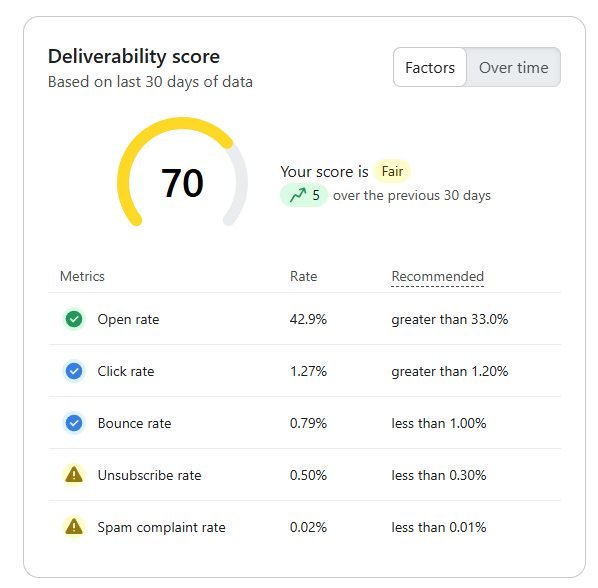
Reading the score. This account scores 70 (Fair). Opens and bounces are fine, but unsubscribes (0.50%) and spam complaints (0.02%) are above Klaviyo's recommended levels. That tells me where to look first.
In Klaviyo's Deliverability hub, I review
Campaigns and flows, one by one
Bounces, hard and soft
Spam complaint trends
Unsubscribe behavior and spikes
Domain issues
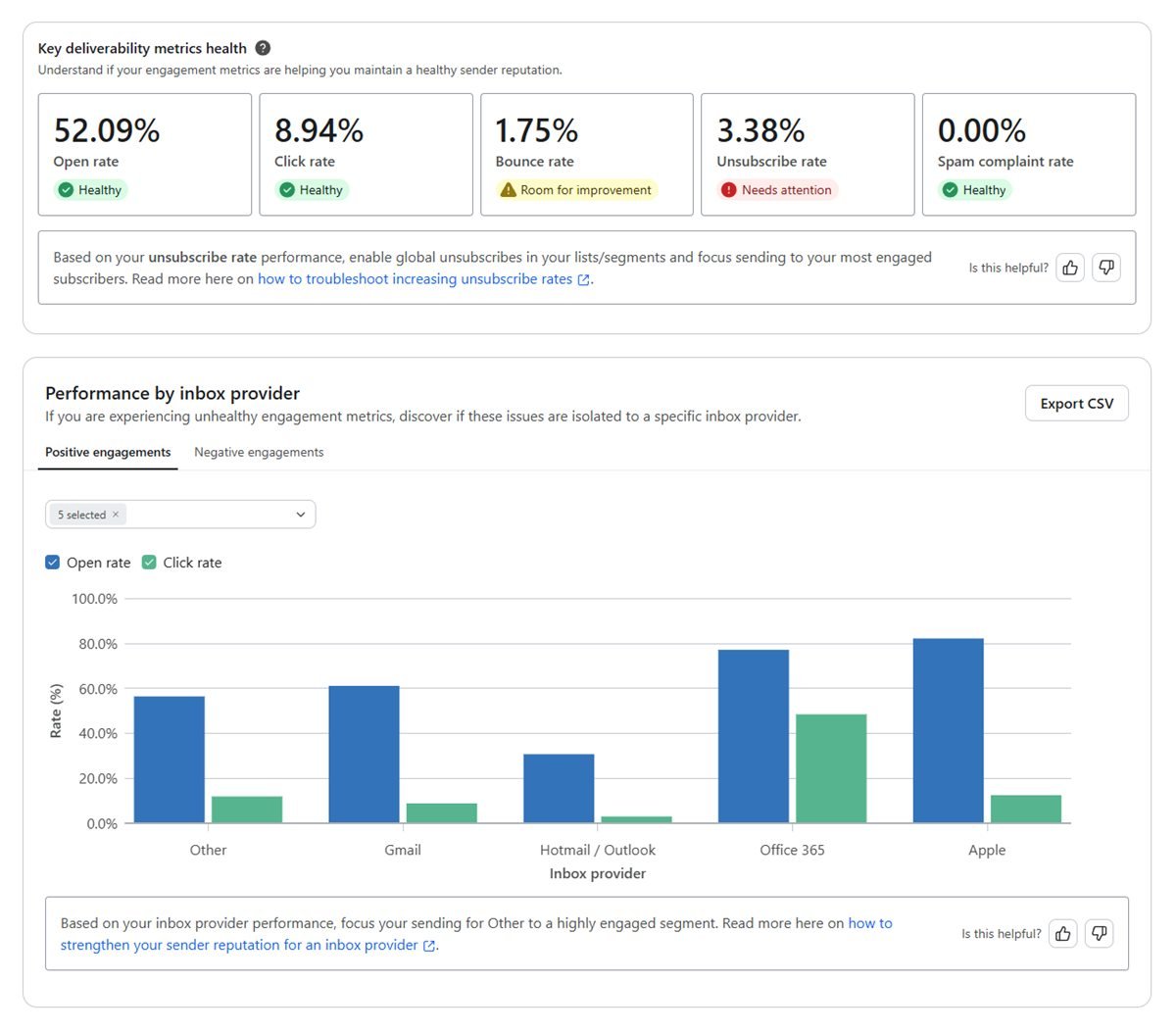
Performance by inbox provider: Gmail, Outlook, Yahoo, and Apple
In Google Postmaster Tools
For brands with enough Gmail volume, I check spam rate, domain reputation, IP reputation, authentication, and delivery errors. Klaviyo recommends it as part of deliverability monitoring too.
When one campaign has normal complaints and the next has a sudden spike, I investigate that specific send: the audience, subject line, message, frequency, and offer.
One win-back campaign's report. Opens, clicks, and complaints were healthy, but Klaviyo flagged the unsubscribe rate. It's the kind of per-email signal an account average hides.
My deliverability audit
What I check, area by area.
Klaviyo deliverability audit
Area
What I check
Sending domain
Shared or branded
DKIM
Correct authentication
SPF
Correct setup, no conflicting records
DMARC
Exists, valid policy, alignment
Domain alignment
From address vs sending domain
Click tracking
Dedicated, branded domain
Sender reputation
Domain and IP signals
Warming
New infrastructure ramped correctly
List quality
Invalid and unengaged contacts
Engagement
Opens, clicks, and purchases
Bounces
Hard and soft
Complaints
Spam complaint trends
Unsubscribes
Rate and spikes
Segmentation
Sending to engaged audiences
Campaign frequency
Over- or under-sending
Flow frequency
Campaigns and flows colliding
Sunset strategy
Suppressing unengaged profiles
Signup forms
Consent and list quality
Gmail requirements
Authentication, unsubscribe, complaints
Yahoo requirements
Authentication and one-click unsubscribe
Postmaster Tools
Gmail reputation, when data is available
Deliverability is one part of my full Klaviyo audit. If your flows, campaigns, and segments need a review too, I cover everything in one report.
Results
From spam folder back to the inbox.
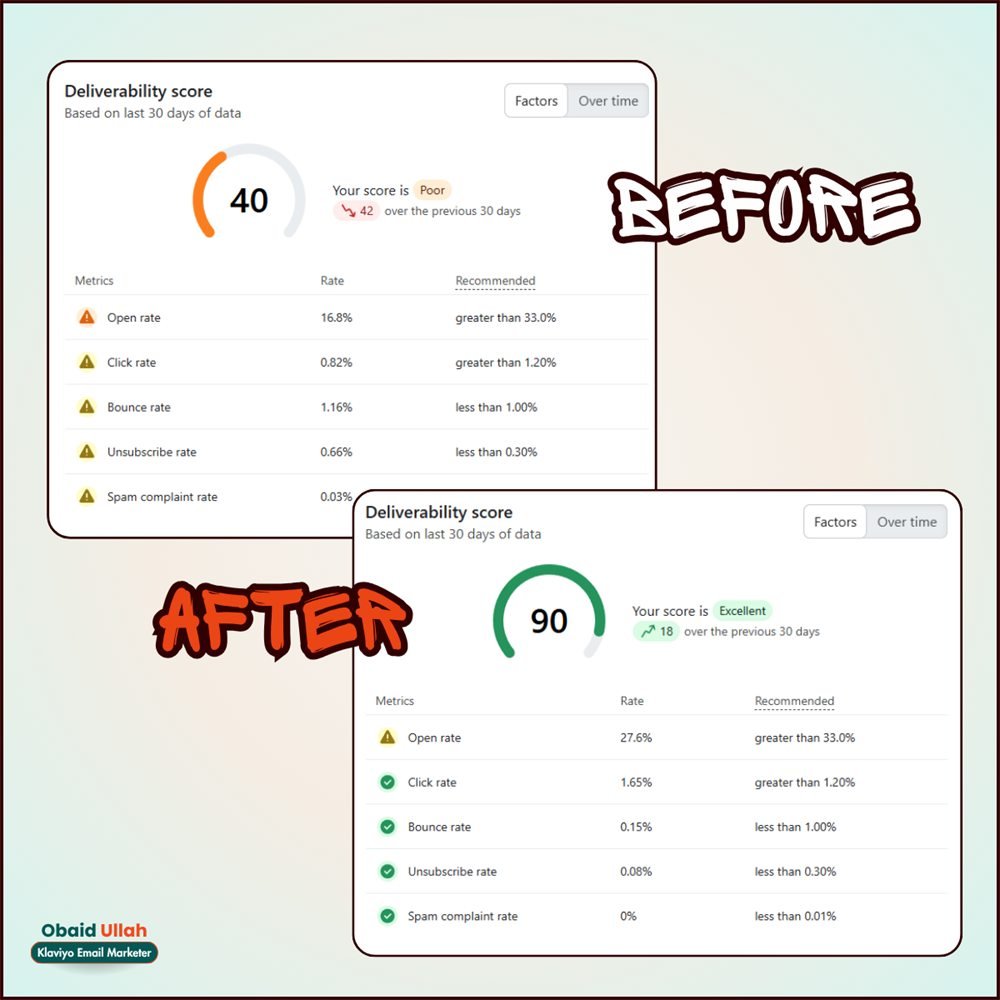
One client's Klaviyo deliverability score went from 40 (Poor) to 90 (Excellent) after I cleaned up their setup and sending.
Obaid rebuilt our entire Klaviyo from scratch in under two weeks. He didn't just
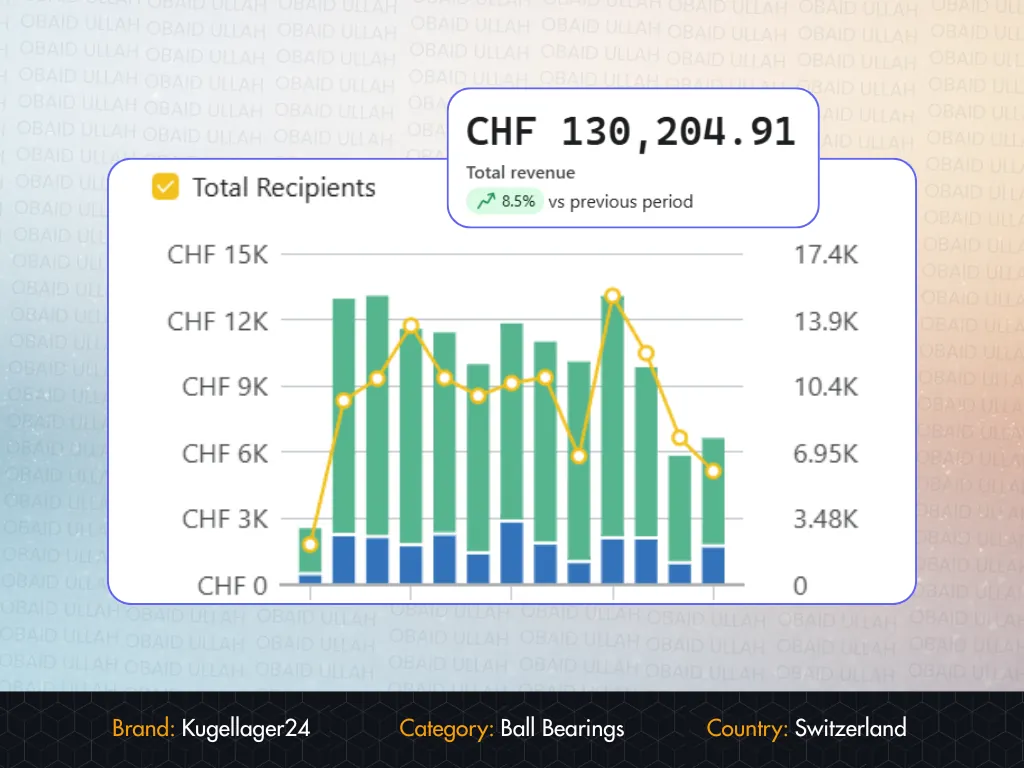
execute, he explained every decision. Within 60 days our email was driving 34% of revenue.
Filip Krsticevic
Founder, Kugellager24.ch
★★★★★
Fiverr
"
Obaid U is a stellar freelancer in email marketing, showcasing STRATEGIC thinking and meticulous attention to detail. Working with him is a breeze thanks to his quick responses, politeness, and deep understanding of the project needs. Highly recommend! 👏
Working with Obaid U in the realm of Email Marketing was an EXCEPTIONAL experience. The professionalism and attention to detail in his work exceeded expectations, while his proactive communication and cooperation made the process smooth and efficient. Highly recommend for anyone looking to elevate their email marketing efforts! 🙌
It's how reliably your Klaviyo emails reach the inbox instead of being rejected, blocked, or sent to spam. Delivery only means Gmail or Yahoo accepted the email; deliverability is where it actually lands.
For a serious ecommerce brand, yes. Klaviyo's shared domain works to start with, but a branded sending domain, like send.yourbrand.com, gives you your own reputation to control and aligns with your From address for DMARC.
Usually not. When I set up your branded sending domain with the records Klaviyo provides, Klaviyo handles SPF. A domain should only have one SPF record, so adding another one for Klaviyo is a common mistake.
I usually start with p=none, which monitors without rejecting anything, as Klaviyo recommends. I only move to quarantine or reject after confirming every service that sends email from your domain is authenticated.
Authentication only gets you through the door. Mailbox providers also look at engagement, spam complaints, bounces, list quality, and how consistently you send. That's why I review your segments, frequency, and sunset strategy too.
Gmail and Yahoo require bulk senders to stay below 0.3%, but that's a ceiling, not a target. Klaviyo recommends staying below 0.01%, and that's what I aim for.
Only with your approval, and only using the exact records Klaviyo generates for your account. I check your existing SPF, DKIM, and DMARC first, so nothing that already works, like your Google Workspace email, breaks.
Most brands don't. A dedicated sending domain matters far more. A dedicated IP only makes sense with high, consistent volume and strong engagement, because you carry the IP's reputation on your own.
Let's talk
Let's get your emails back in the inbox.
Tell me what you're seeing: low open rates, a spam complaint warning, or a new domain you need to set up. The first conversation is free, and you'll leave it knowing what to fix first.