Klaviyo migration for Shopify and WooCommerce brands
I move your email and SMS marketing to Klaviyo without losing subscribers, unsubscribes, or revenue along the way. Your lists, consent, and suppressions move over cleanly, your flows and templates are recreated properly in Klaviyo, and the switch happens on a planned day, so customers never get two welcome emails or none at all.
★★★★★ 5.0 on Fiverr and Upwork · 190+ projects delivered · Klaviyo Product certified
Brands I've worked with
Afritude
Pestle & Pods
KUGELLAGER24
MagneCHEF
LipoTek
MantaSocks
Flushhh
G_CERO
Love Coco
Always Friday
+ more under NDA
Why it matters
Switching platforms is where brands quietly lose money.
Exporting a CSV and importing it into Klaviyo takes ten minutes. That's not a migration. The real work is everything around it: who is allowed to receive email, which flows must keep running, when the old platform stops sending, and how a brand-new sending domain earns trust with Gmail. When those details are rushed, these are the problems I'm usually called in to fix.
Unsubscribes imported as subscribersPeople who opted out start getting emails again, and complaints follow.
Double emails at cutoverThe old welcome flow and the new one both fire for a week.
A gap with no flowsAbandoned checkouts go unrecovered while flows are being set up.
Blasting the whole list on day oneA new sending setup with no reputation gets sent to spam.
Old popups still liveTwo signup forms, or new subscribers landing in the old platform.
SMS numbers without proof of consentA compliance risk that can shut down texting.
Flows copied one to oneThe same weak automations, just on a new platform.
No revenue baselineNobody can tell whether the switch actually helped.
What moves and what doesn't
Some things import. Some I recreate.
Not everything on your old platform can be exported. Knowing which is which is the first step of a clean migration.
Moves over
Exported from your old platform and imported into Klaviyo.
Profiles and their email consent status
Unsubscribes, bounces, and complaints, as suppressions
Custom properties like birthday or preferences
Tags and groups, as lists or properties
SMS subscribers with documented consent
Syncs from your store
Pulled in by Klaviyo's Shopify or WooCommerce integration.
Historical orders and customers
Products and catalog
Checkouts and cart activity going forward
Site activity once Klaviyo tracking is on
Discount codes where your store supports them
I recreate in Klaviyo
Automations and designs don't transfer between platforms.
Flows, rebuilt with Klaviyo's triggers and filters
Email templates, set up natively and editable
Signup forms and popups
Segments, using Klaviyo's own data
SMS keywords and opt-out settings
Open and click history doesn't transfer. Klaviyo starts with no record of who engaged on your old platform. Before I export, I save each profile's recent engagement as a property, so I can still send to your most engaged people first while the new sending setup warms up.
Translating your setup
Same idea, different names.
Every platform organizes things a little differently. This is how I map what you have today onto Klaviyo.
From your old platform to Klaviyo
On your old platform
In Klaviyo
What I watch for
Audience or main list
Lists
Usually one main newsletter list, not dozens of old ones
Tags and groups
Lists or custom properties
Only the tags you'll actually use for segmenting
Automations or journeys
Flows
Triggers, filters, and exits set up the Klaviyo way
Segments
Segments
Rebuilt on order and site data, not old open history
Popups and embedded forms
Signup forms
The old forms removed so there's never two
Merge tags
Template tags
Fallbacks, so no one gets “Hi ,”
Unsubscribed and cleaned contacts
Suppressed profiles
Imported before anything is sent
MailchimpMailerLiteOmnisendShopify EmailPrivyAny platform that exports to CSV
My process
Six phases, from inventory to warm-up.
Phase 1
Inventory and baseline
I list every live flow, form, list, integration, and SMS program on your current platform, and record your email revenue, so we can measure the switch honestly.
Phase 2
Klaviyo foundation
I connect Shopify or WooCommerce, sync your order history, and set up a branded sending domain with SPF, DKIM, and DMARC before any email goes out.
Phase 3
Clean data import
Suppressions first, then subscribers with the right consent status, then properties. I leave out bounced, fake, and long-dead addresses instead of carrying them over.
Phase 4
Recreate and improve
Flows, templates, signup forms, and segments, set up natively in Klaviyo. I don't copy weak flows; I fix them while they're being recreated.
Phase 5
Cutover
On one planned day, the Klaviyo flows go live and the old ones stop. Forms switch over, and I test everything with real signups and orders.
Phase 6
Warm-up and review
Campaigns start with your most engaged profiles and widen gradually. Then I compare results against the baseline from phase 1.
Cutover day
One switch, in the right order.
The order matters more than the speed. This is the sequence I follow, so there's never a moment when customers get two emails, or none.
Before anything elseLatest suppressions imported
Anyone who unsubscribed on the old platform, right up to today.
Step 2Final subscriber sync
Signups since the main import, so no one falls through the gap.
Step 3Klaviyo flows set live
Welcome, abandoned checkout, cart, browse, post-purchase, and the rest.
Same hourOld flows paused
Each old automation stops as its Klaviyo version starts.
Step 5Forms switched
Klaviyo signup forms on, old popups and embed codes removed.
Step 6Live tests
A real signup, an abandoned checkout, and a test order, checked end to end.
What I keep on the old platform, for now
Your account, so reports and exports stay available
Its DNS records, until the switch is complete
A final export of all campaign and flow reports
Once everything has run cleanly in Klaviyo, I remove the old tracking scripts and DNS records, and you can cancel the old subscription.
Deliverability after the move
A new platform starts with no reputation.
Gmail and Yahoo know your old sending setup. They don't know Klaviyo's yet. The first weeks after a migration decide whether your emails keep landing in the inbox.
How I warm up after a migration
First sendsProfiles who engaged most recently on your old platform
NextEngaged in the last 30 days
ThenEngaged in the last 60, then 90 days
OngoingUnengaged profiles get re-engagement, not every campaign
What I set up before the first send
Branded sending domain, like send.yourbrand.com
SPF, DKIM, and DMARC, without breaking your existing email
Branded click tracking
Engaged segments based on the imported engagement property
Flows first, since they send to people who just acted
SMS consent is stricter than email consent, so I treat moving SMS as its own project.
Consent you can prove
I only import SMS subscribers whose consent is documented, with when and where they opted in. A list of phone numbers on its own isn't permission to text anyone.
Sender set up first
Your Klaviyo sending number or sender ID has to be set up, and approved where your country requires it, before the first text goes out. I plan the cutover around that.
Opt-outs carried over
People who texted STOP on your old platform stay opted out in Klaviyo. I also set up STOP, HELP, and START keywords, quiet hours, and Smart Sending. See my Klaviyo SMS page.
Rules differ by country and state. I follow Klaviyo's tools and recommended practices, but I don't give legal advice. If you're unsure about your SMS consent records, I recommend checking with qualified counsel before importing.
Better, not just moved
A migration is the best time to fix what wasn't working.
You're recreating everything anyway, so I use the move to set up what your old platform was missing.
Copied one to one
The same single welcome email
One abandoned cart flow for every cart
Campaigns sent to the whole list
Templates as one big image
Recreated properly in Klaviyo
Welcome series split by buyers and non-buyers
Separate checkout, cart, and browse flows
Engaged segments for every campaign
Native, editable, mobile-first templates
Where to go next: the flows I usually add are on my Klaviyo flows page. If you're not sure whether to migrate at all, a Klaviyo audit of your current setup is a good first step.
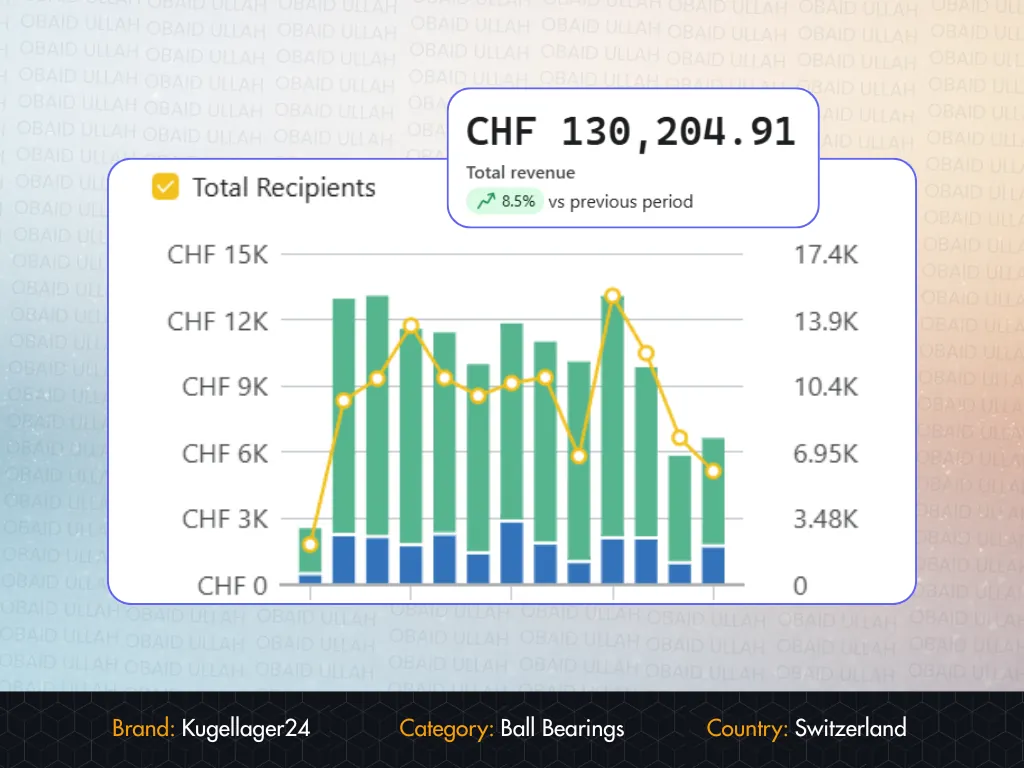
Obaid rebuilt our entire Klaviyo from scratch in under two weeks. He didn't just
execute, he explained every decision. Within 60 days our email was driving 34% of revenue.
Filip Krsticevic
Founder, Kugellager24.ch
★★★★★
Fiverr
"
The Great Work That has Been Done by This Selling - Top Class and Very Professional and The Price Of This Service Is Fantastic so I Will Be Forced To Carry On Working With This Seller For a Very Long Time, as they are Simply The Very Best I Have Ever Worked With When It Comes to Price and Top Class Quality. Excellent Services.
Obaid U is a stellar freelancer in email marketing, showcasing STRATEGIC thinking and meticulous attention to detail. Working with him is a breeze thanks to his quick responses, politeness, and deep understanding of the project needs. Highly recommend! 👏
It depends on how many flows, forms, and templates you have, and whether SMS is involved. A small setup moves much faster than a large account with many automations. After the free consultation, I give you a timeline based on what's actually running on your current platform.
No. I import your subscribers with their consent status, and I import unsubscribed, bounced, and complained profiles as suppressions before anything is sent, so people who opted out stay opted out.
No platform lets you import automations into Klaviyo directly, so I recreate your flows in Klaviyo. That's also the best moment to improve them rather than copy them one to one.
Not as Klaviyo engagement data. Before exporting, I save each profile's recent engagement as a property, so I can still target your most engaged people first while the new sending setup warms up.
That's the biggest risk of any migration. I set up a branded sending domain with SPF, DKIM, and DMARC, then warm up gradually by starting with your most engaged profiles instead of emailing the whole list on day one.
Yes, when their consent is documented, including when and where they opted in. Opt-outs stay opted out, and your Klaviyo sender has to be set up before the first text goes out.
Not if the cutover is planned. On one day, each Klaviyo flow goes live as its old version is paused, the signup forms switch over, and I test with real signups and orders.
Yes. I connect Klaviyo's Shopify or WooCommerce integration, sync your historical orders, and set up tracking, so your flows and segments work with real store data from the start.
Let's talk
Let's move you to Klaviyo without losing a thing.
Tell me which platform you're on and what's running there today. The first conversation is free, and you'll leave it with a clear migration plan and a realistic timeline.